Repair: A Modern Typeface for Clean, Inviting Designs
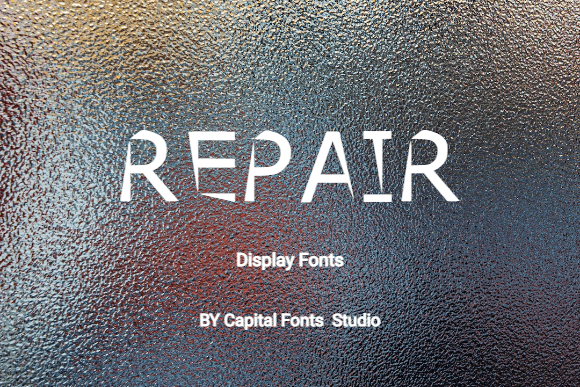
Finding a font that feels both contemporary and approachable can be a real challenge. You want something with personality that doesn't overwhelm, and clarity that doesn't feel cold. That's the sweet spot where Repair operates. This display typeface blends smooth curves with defined edges, creating a visual rhythm that's easy on the eyes yet distinctly modern. It’s the kind of font that doesn’t shout for attention but confidently holds it, making it a versatile tool for a wide array of creative and commercial projects.
A Font That Balances Style with Substance
What makes a typeface like Repair work so well in practice? It’s all in the design philosophy. The smooth curves soften the overall appearance, lending a friendly and accessible vibe. Meanwhile, the sharp edges provide structure and a contemporary edge, preventing the font from looking overly casual or whimsical. This duality is key. It allows Repair to feel professional enough for a corporate identity yet warm enough for a lifestyle brand. The generous spacing and clear letterforms contribute to its excellent readability, whether viewed on a small mobile screen or a large printed poster.
Consider the practical implications. For a small business owner crafting a logo, this font offers a balance between standing out and feeling trustworthy. For a content creator designing social media graphics, it ensures text remains legible even when overlaid on complex images. Its inherent clarity reduces cognitive load for the viewer, which is a subtle but powerful advantage in any visual communication.
Practical Applications Across Your Projects
The true test of any design asset is its versatility. Repair shines in numerous contexts, adapting to the needs of the project while maintaining its core character.
- Branding & Logo Design: A logo sets the first impression. Repair’s clean modernity makes it an excellent candidate for primary logotypes or as a complementary font for brand names. It conveys innovation and approachability, which is a winning combination for startups, tech companies, and creative studios.
- Packaging Design: On a shelf or in an online store, packaging needs to communicate quickly. The font’s readability ensures product names and key information are instantly graspable, while its style helps differentiate the product from competitors.
- Digital Presence: From website headers to blog post titles and email newsletters, Repair helps create a cohesive and professional online identity. Its display nature makes it perfect for headlines and calls-to-action, guiding the user’s eye effectively.
- Marketing & Social Media: In the fast-scrolling world of social media, grabbing attention is paramount. Use Repair for impactful quotes, promotional banners, and story graphics. Its inviting look can increase engagement, making viewers more likely to stop and read.
- Print & Merchandise: The font translates beautifully to physical materials. Think business cards, brochures, event posters, or even merchandise like tote bags and t-shirts. It retains its clarity and charm at various sizes, which is crucial for print production.
For entrepreneurs and designers building a brand identity system, choosing a font like Repair can simplify decision-making. Its versatility means you might use it across multiple touchpoints—from your website to your invoices—creating a unified visual language that strengthens brand recognition.
Making the Most of Your Typography Choice
Selecting the right font is just the first step. Using it effectively is what brings your project to life. Here’s how to integrate a typeface like Repair into your workflow with confidence.
Pairing with Purpose: A display font rarely works alone. The key is to find a companion that complements without competing. Repair pairs beautifully with a simple, neutral sans-serif for body text. Think of it as a conversation: Repair makes the bold opening statement, and a font like a clean geometric sans-serif delivers the supporting details clearly. Avoid pairing it with another highly stylized display font, as this can create visual chaos.
Test Before You Commit: Always preview your font choice in context. Type out the actual words you’ll be using—the brand name, a key headline, a product description. Check how the letterforms interact. Are the spacing and kerning (the space between specific letter pairs) visually pleasing? Does it remain legible at the sizes you plan to use? A quick mockup in your design software is worth a thousand theoretical considerations.
Explore the Full Family: Many premium font packages include multiple styles—bold, light, italic, or condensed versions. If Repair comes with these variations, explore them. A bold weight can add emphasis for key points, while a light weight can create a more delicate feel for subheadings. This gives you more tools to create hierarchy and visual interest within a single typographic system.
Considering the Practical Details
Beyond aesthetics, there are practicalities to address, especially for commercial use. If you’re a freelancer, agency, or business using the font for client work or your own brand, ensure you have the correct commercial license. This legal permission protects you and the font creator, allowing you to use the typeface in projects that generate revenue without worry.
Also, consider the technical format. Ensure the font files are compatible with your software, whether it’s Adobe Creative Suite, Canva, Procreate, or your website’s content management system. Most modern fonts come in standard formats like OTF or TTF, and web fonts are often provided for digital projects.
Ultimately, a font is more than just letters on a screen; it’s a fundamental component of your project’s voice. A typeface like Repair, with its blend of modernity and warmth, offers a reliable foundation. It helps you present your ideas with clarity and style, ensuring your visual communication is as effective as your message. By understanding its strengths and applying it thoughtfully, you can enhance the professionalism and appeal of everything you create.