Yotsuba: The Bold, Friendly Font for Impactful Designs
You know that moment when you're scrolling through a feed or walking down a street, and a headline just grabs you? It's not just the words—it's the typeface. Thick, confident, and impossible to ignore, yet somehow still approachable. That's the sweet spot a great display font needs to hit, and it's exactly where Yotsuba lives. If you've been searching for a typeface that commands attention without shouting, that feels modern but not cold, and that packs serious visual punch into a compact form, you've just found your new secret weapon.
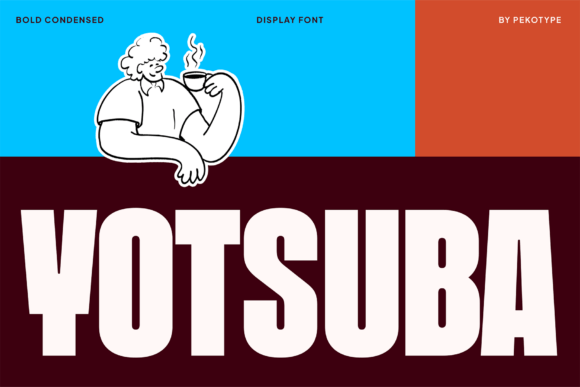
At its core, Yotsuba is a bold, condensed display typeface. But let's unpack what that actually means for your work. "Bold" means the letterforms have substantial weight and presence. "Condensed" means they're designed to be narrower than standard fonts, allowing you to fit more impact into less horizontal space. This combination is gold for designers and creators who need headlines that pop on everything from a tiny social media square to a massive billboard. The characters are built with chunky, geometric shapes but feature smooth, rounded details. This subtle softness is key—it prevents the font from feeling aggressive or unapproachable, giving it a friendly, almost playful personality even at very large sizes.
A Typeface with Personality: Strong Yet Approachable
The visual character of Yotsuba is its biggest selling point. It doesn't try to be everything; it knows exactly what it is: a powerful headline maker. The letters are tight and strong, creating a unified, blocky appearance that reads as solid and reliable. This makes it perfect for projects where you need to convey stability, energy, or contemporary flair. Think of a craft brewery's logo, the title card for a tech startup's explainer video, or the hero text on a streetwear brand's homepage. Yotsuba fits seamlessly into these contexts because its design speaks the language of modern, confident branding.
But it's not all about brute force. The rounded edges and smooth curves inject a dose of friendliness and accessibility. This duality is incredibly useful. It allows the font to work for a children's educational app just as well as it does for a bold advertising campaign. The all-caps design further emphasizes its display nature, making every word feel like a statement. When you set a line of text in Yotsuba, you're not just writing—you're declaring.
Practical Power: Where Yotsuba Truly Shines
So, where do you actually use a font like this? Its versatility might surprise you. Because it's a premium font designed for impact, it excels in applications where first impressions are critical and space might be limited.
- Branding & Logo Design: For logos that need to be recognizable at a glance, Yotsuba's condensed, bold form is ideal. It creates a strong logotype that can anchor a brand identity system. Pair it with a clean sans serif or a elegant serif font for body text to create a balanced hierarchy.
- Packaging & Product Labels: Imagine this font on a beverage can, a snack bag, or a cosmetic jar. Its boldness ensures the product name jumps off the shelf, while the friendly details keep it inviting. It’s a natural fit for modern packaging design.
- Social Media Graphics & Digital Ads: In the fast-scroll world of Instagram, TikTok, and Facebook ads, you have milliseconds to catch someone's eye. Yotsuba’s powerful presence makes it perfect for quote graphics, sale announcements, and video thumbnails. Its compact style means you can make the text large without it dominating the entire canvas, leaving room for imagery.
- Posters, Signage & Environmental Graphics: From event posters to in-store signage and even street-style designs, this font is built to be seen from a distance. Its tight kerning and bold weight ensure readability even in busy visual environments.
- Websites & Blogs: Use it strategically for hero sections, article titles, or call-to-action buttons. It instantly sets a modern, energetic tone for your digital presence. Just remember, it's a display font—save it for headlines, not your 500-word blog paragraphs.
- Merchandise & Apparel: T-shirts, hats, and tote bags benefit enormously from fonts that look good when screen-printed or embroidered. Yotsuba's simple, robust shapes translate perfectly to physical merchandise.
- Editorial & Marketing Collateral: Magazine covers, report covers, brochure headers, and email newsletter banners can all leverage its impactful style to guide the reader's eye and emphasize key messages.
Integrating Yotsuba into Your Design Workflow
Adopting a new typeface is more than just a download; it's about understanding how it fits into your creative process. Here’s some practical advice for making the most of Yotsuba.
First, consider your project's goal. Is it to feel energetic and youthful? Professional and sturdy? Quirky and fun? Yotsuba leans toward the energetic and modern, but its rounded details can be pushed toward friendly or even playful with the right color palette and accompanying graphics. If your project calls for a serious, traditional, or highly luxurious feel, a different typeface style—perhaps a refined serif or a minimalist sans serif—might be a better starting point.
Second, test font pairings relentlessly. A great display font like Yotsuba needs a partner. It almost always needs a simpler, more neutral typeface for body copy. Try pairing it with a geometric sans serif like Montserrat or a humanist sans serif like Open Sans for a clean, modern look. For a more editorial or sophisticated vibe, contrast it with a classic serif like Lora or Merriweather. The key is contrast in style but harmony in mood. Set a sample headline in Yotsuba and then write a paragraph beneath it in your chosen body font. Does it feel balanced? Or is one fighting the other for attention?
Third, mind the readability at scale. While Yotsuba is designed for legibility at large sizes, always test it in the context of your final output. A font that looks stunning on your 27-inch monitor might need slight size or letter-spacing adjustments when viewed on a mobile phone screen. For print, consider the medium—a coarse canvas bag versus a glossy magazine page will render the type differently.
Finally, review the included file formats. Yotsuba comes in the standard OTF and TTF formats, ensuring compatibility across virtually all design software, from Adobe Creative Suite to Canva and even many website builders. This makes it a flexible asset in your toolkit. And importantly, understand the licensing. Since it's a commercial font, ensure you have the appropriate license for your intended use, whether it's for a single client project, unlimited personal projects, or for a product you intend to sell. This protects both you and the font creator.
Standing Out in a Crowded Visual Landscape
In a world saturated with content, the typography you choose is a silent ambassador for your message. It can build brand recognition, ensure visual consistency across platforms, and significantly improve audience engagement. A well-chosen font like Yotsuba does more than just display words; it conveys attitude, sets a mood, and helps create a professional presentation that builds trust.
It’s not about chasing trends, but about selecting tools that align with your vision. If your goal is to create designs that feel bold, fun, and immediately impactful, then a typeface with the character and capability of Yotsuba is worth serious consideration. It’s a creative asset built for the demands of modern visual communication, ready to help your next project stand out instantly, whether it’s on a screen, a package, or a city street.